SENDO JOURNEY API
Send the notification using multiple channels in a single request. Example: The first attempt will be through the PUSH channel, and if it is not delivered — failover — it will be sent via SMS.
Execute a Journey
POSThttps://api.sendo.cloud/api/journey
This endpoint executes a journey.
Required Fields
| Field | Type | Description | Example |
|---|---|---|---|
| event | string | Name of the event to execute the journey. | |
| variables | object | This is an extension of the person object that can have custom variables. | { "balance": "Enterprise", "type": "PRE", "name": "Jasson" } |
| category | string | Corresponds to the type of sending; the possible values can be marketing, otp, or transaction. | |
| person | object | User of the Journey, See Person Definition |
| Code | Description |
|---|---|
| 200 | OK |
{
    "messageId": "fed3fdfc-5fc6-456e-95b7-298a899dab87",
    "message": "Journey queued"
}| Code | Description |
|---|---|
| 404 | Not Found |
  {
    "message": "The journey does not exist",
    "error": "Not Found",
    "statusCode": 404
  }
Definitions
Person
| Field | Type | Description | Example |
|---|---|---|---|
| id | string | User's external identifier | |
| string | |||
| phone | string | User's phone number, including the country code. Also can be used as variable | 593999999999 |
Journey Workflow
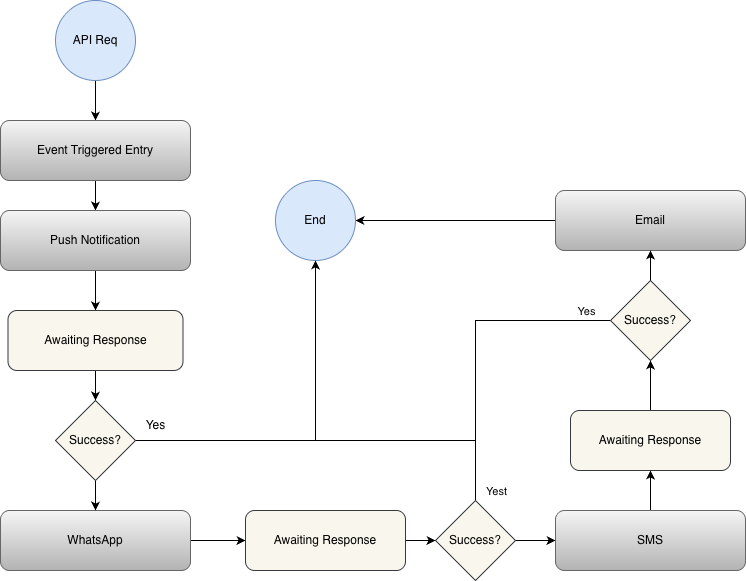
Event Entry
Users enter journeys with Event Entry immediately when they send a TRACK event with the specified name. Event Entry are useful for what might traditionally considered transactional messaging. For example, journeys with Event Entry are appropriate for sending order confirmation, password reset, or order cancellation emails. With every matching event, a new instance of the journey is created for the user.